728x90
car_evaluation 데이터셋
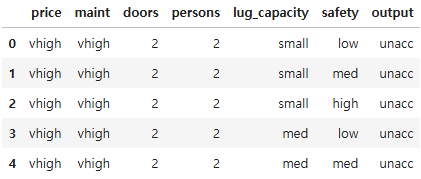
- 컬럼 구성
- price : 자동차 가격
- maint : 자동차 유지 비용
- doors : 자동차 문 개수
- persons : 수용 인원
- lug_capacity : 수하물 용량
- safety : 안전성
- output(종속 변수): 차 상태
- 아래의 범주 중 하나의 값을 가짐
- unacc : 허용 불가능한 수준
- acc : 허용 가능한 수준
- good : 양호
- vgood : 매우 좋은(very good)
- 아래의 범주 중 하나의 값을 가짐
import torch
import torch.nn as nn
import numpy as np
import pandas as pd
import matplotlib.pyplot as plt
import seaborn as sns
import os
os.environ["KMP_DUPLICATE_LIB_OK"] = "True"
# 윈도우에서 이미지 관련 처리 할 때 충돌이 일어나기 때문에 이 코드로 해결
데이터 준비
dataset = pd.read_csv("./data/car_evaluation.csv")
dataset.head()
dataset.shape
(1728, 7)
dataset.dtypes
price           object
maint           object
doors           object
persons         object
lug_capacity    object
safety          object
output          object
dtype: object
dataset["output"].value_counts()
output
unacc    1210
acc       384
good       69
vgood      65
Name: count, dtype: int64
plt.figure(figsize = (8, 6))
dataset["output"].value_counts().plot(kind = "pie", autopct = "%0.05f%%",
colors = ["lightblue", "lightgreen", "orange", "pink"],
explode = (0.05, 0.05, 0.05, 0.05))
plt.show()

# 데이터를 범주형 타입으로 변환
categorical_columns = ["price", "maint", "doors", "persons", "lug_capacity", "safety"]
# astype() 메서드를 이용하여 데이터를 범주형으로 변환
for category in categorical_columns:
dataset[category] = dataset[category].astype("category")
# 정수형태로 바꿔주기 위해 사용
dataset.dtypes
price           category
maint           category
doors           category
persons         category
lug_capacity    category
safety          category
output            object
dtype: object
dataset.head()
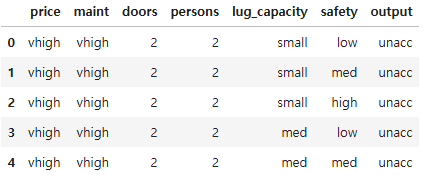
- 범주형 데이터를 텐서로 변환하기 위한 절차
- 범주형 데이터 -> astype("category") -> 넘파이 배열 -> 텐서
# 범주형 데이터를 넘파이 배열로 변환
price = dataset["price"].cat.codes.values
maint = dataset["maint"].cat.codes.values
doors = dataset["doors"].cat.codes.values
persons = dataset["persons"].cat.codes.values
lug_capacity = dataset["lug_capacity"].cat.codes.values
safety = dataset["safety"].cat.codes.values
categorical_data = np.stack([price, maint, doors, persons, lug_capacity, safety], 1)
categorical_data[:10]
array([[3, 3, 0, 0, 2, 1],
       [3, 3, 0, 0, 2, 2],
       [3, 3, 0, 0, 2, 0],
       [3, 3, 0, 0, 1, 1],
       [3, 3, 0, 0, 1, 2],
       [3, 3, 0, 0, 1, 0],
       [3, 3, 0, 0, 0, 1],
       [3, 3, 0, 0, 0, 2],
       [3, 3, 0, 0, 0, 0],
       [3, 3, 0, 1, 2, 1]], dtype=int8)
# 배열을 텐서로 변환
categorical_data = torch.tensor(categorical_data, dtype = torch.int64)
categorical_data[:10]
tensor([[3, 3, 0, 0, 2, 1],
        [3, 3, 0, 0, 2, 2],
        [3, 3, 0, 0, 2, 0],
        [3, 3, 0, 0, 1, 1],
        [3, 3, 0, 0, 1, 2],
        [3, 3, 0, 0, 1, 0],
        [3, 3, 0, 0, 0, 1],
        [3, 3, 0, 0, 0, 2],
        [3, 3, 0, 0, 0, 0],
        [3, 3, 0, 1, 2, 1]])
# 레이블로 사용할 컬럼을 텐서로 변환
outputs = pd.get_dummies(dataset["output"])
outputs = outputs.values
outputs = torch.tensor(outputs.argmax(axis = 1)).flatten()
outputs
tensor([2, 2, 2, ..., 2, 1, 3])
# 독립변수의 shape
categorical_data.shape
torch.Size([1728, 6])
# 종속변수의 shape
outputs.shape
torch.Size([1728])
# 범주 개수
len(dataset["price"].cat.categories)
4
dataset["price"].nunique()
4
# 각 범주 간의 세부적인 관계를 잘 파악하기 위해 임베딩(레이어의 개수는 컬럼수)
# 임베딩 크기는 각 컬럼의 고유값 수 나누기 2로 임의로 사용
categorical_column_sizes = [len(dataset[column].cat.categories) for column in categorical_columns]
categorical_embedding_sizes = [(col_size, min(50, (col_size + 1) // 2))
for col_size in categorical_column_sizes]
# (범주형 컬럼의 고유값 수, 차원의 크기)
print(categorical_embedding_sizes)
[(4, 2), (4, 2), (4, 2), (3, 2), (3, 2), (3, 2)]
데이터 분할
# 데이터셋 분리(8 : 2) - 데이터가 섞여있으므로 섞을 필요가 없음
# 앞에서 부터 80%를 훈련데이터, 나머지를 테스트데이터로 사용
total_records = categorical_data.shape[0]
test_records = int(total_records * 0.2)
categorical_train_data = categorical_data[:total_records - test_records]
categorical_test_data = categorical_data[total_records - test_records : total_records]
train_outputs = outputs[:total_records - test_records]
test_outputs = outputs[total_records - test_records : total_records]
print(len(categorical_train_data))
print(len(train_outputs))
print(len(categorical_test_data))
print(len(test_outputs))
1383
1383
345
345
모델 생성
class Model(nn.Module):
def __init__(self, embedding_size, output_size, layers, p = 0.4):
'''
모델에서 사용될 파라미터와 신경망을 초기화하기 위한 용도
객체가 생성될 때 자동으로 호출됨
embedding_size : 범주형 컬럼의 임베딩 크기
output_size : 출력층의 크기
layers : 모든 계층에 대한 목록
p : 드롭아웃(기본값은 0.5)
'''
super().__init__()
self.all_embeddings = nn.ModuleList([nn.Embedding(ni, nf) for ni, nf in embedding_size])
self.embedding_dropout = nn.Dropout(p)
all_layers = []
num_categorical_cols = sum((nf for ni, nf in embedding_size))
input_size = num_categorical_cols
for i in layers:
# 전 결합층
all_layers.append(nn.Linear(input_size, i))
# 활성화 함수
all_layers.append(nn.ReLU(inplace = True))
# 배치 정규화
# 신경망 안에서 데이터의 평균과 분산을 조정
all_layers.append(nn.BatchNorm1d(i))
# 드롭아웃
all_layers.append(nn.Dropout(p))
input_size = i
all_layers.append(nn.Linear(layers[-1], output_size))
self.layers = nn.Sequential(*all_layers)
def forward(self, x_categorical):
'''
학습 데이터를 입력받아서 연산을 진행
모델 객체를 데이터와 함께 호출하면 자동으로 실행
'''
embeddings = []
for i, e in enumerate(self.all_embeddings):
embeddings.append(e(x_categorical[:, i]))
x = torch.cat(embeddings, 1)
x = self.embedding_dropout(x)
x = self.layers(x)
return x
# Model 객체 생성
# (범주형 컬럼의 임베딩 크기, 출력 크기, 은닉층의 유닛, 드롭아웃 비율)
model = Model(categorical_embedding_sizes, 4, [200, 100, 50], p = 0.4)
model
Model(
  (all_embeddings): ModuleList(
    (0-2): 3 x Embedding(4, 2)
    (3-5): 3 x Embedding(3, 2)
  )
  (embedding_dropout): Dropout(p=0.4, inplace=False)
  (layers): Sequential(
    (0): Linear(in_features=12, out_features=200, bias=True)
    (1): ReLU(inplace=True)
    (2): BatchNorm1d(200, eps=1e-05, momentum=0.1, affine=True, track_running_stats=True)
    (3): Dropout(p=0.4, inplace=False)
    (4): Linear(in_features=200, out_features=100, bias=True)
    (5): ReLU(inplace=True)
    (6): BatchNorm1d(100, eps=1e-05, momentum=0.1, affine=True, track_running_stats=True)
    (7): Dropout(p=0.4, inplace=False)
    (8): Linear(in_features=100, out_features=50, bias=True)
    (9): ReLU(inplace=True)
    (10): BatchNorm1d(50, eps=1e-05, momentum=0.1, affine=True, track_running_stats=True)
    (11): Dropout(p=0.4, inplace=False)
    (12): Linear(in_features=50, out_features=4, bias=True)
  )
)
모델 파라미터 정의
- 손실 함수와 옵티마이저 정의
loss_function = nn.CrossEntropyLoss()
optimizer = torch.optim.Adam(model.parameters(), lr = 0.001)
# CPU / GPU 사용 지정
if torch.cuda.is_available():
device = torch.device("cuda")
else:
device = torch.device("cpu")
device
device(type='cpu')
모델 학습
# forward메소드를 자동으로 실행함
epochs = 500
aggregated_losses = []
train_outputs = train_outputs.to(device = device, dtype = torch.int64)
categorical_train_data = categorical_train_data.to(device)
for i in range(epochs):
i += 1
y_pred = model(categorical_train_data)
single_loss = loss_function(y_pred, train_outputs)
aggregated_losses.append(single_loss)
if i % 25 == 1:
print(f"epoch: {i:3} loss : {single_loss.item():10.8f}")
optimizer.zero_grad()
single_loss.backward()
optimizer.step()
print(f"epochs: {i:3} loss: {single_loss.item():10.10f}")
epoch:   1 loss : 1.65482366
epoch:  26 loss : 1.21048605
epoch:  51 loss : 1.07630694
epoch:  76 loss : 0.99166936
epoch: 101 loss : 0.83983421
epoch: 126 loss : 0.75660574
epoch: 151 loss : 0.64965403
epoch: 176 loss : 0.61323953
epoch: 201 loss : 0.54826117
epoch: 226 loss : 0.51586044
epoch: 251 loss : 0.50804365
epoch: 276 loss : 0.50301003
epoch: 301 loss : 0.46357074
epoch: 326 loss : 0.46982414
epoch: 351 loss : 0.42423365
epoch: 376 loss : 0.44525698
epoch: 401 loss : 0.44895637
epoch: 426 loss : 0.40693596
epoch: 451 loss : 0.39767554
epoch: 476 loss : 0.41349071
epochs: 500 loss: 0.3892610073
테스트 데이터셋으로 모델 예측
test_outputs = test_outputs.to(device = device, dtype = torch.int64)
categorical_test_data = categorical_test_data.to(device)
# 미분계산을 안 해서 빠른 검증이 가능하도록 함
with torch.no_grad():
y_val = model(categorical_test_data)
loss = loss_function(y_val, test_outputs)
print(f"Loss: {loss:.8f}")
Loss: 1.11235440
# 모델의 예측 확인
print(y_val[:5])
tensor([[-7.9910, -2.9449,  9.1937, -2.5370],
        [-0.8931, -2.8964,  4.5892, -3.0723],
        [-0.4968, -2.4868,  3.6449, -2.6187],
        [-1.7212, -2.1863,  3.4930, -2.0451],
        [ 1.6182, -3.5609,  3.6693, -2.8570]])
# 가장 큰 값을 갖는 인덱스를 확인
y_val = np.argmax(y_val.cpu(), axis = 1)
print(y_val[:5])
tensor([2, 2, 2, 2, 2])
print(test_outputs[:5])
tensor([2, 2, 2, 2, 2])728x90
'09_DL(Deep_Learning)' 카테고리의 다른 글
| 22_이미지 분류 신경망 (0) | 2025.05.02 |
|---|---|
| 21_Fashion_MNIST(파이토치) (2) | 2025.05.02 |
| 19_파이토치_기초문법 (0) | 2025.05.02 |
| 파이토치(pytorch) 설치 방법 (0) | 2025.05.02 |
| 18_konlpy.Okt를 활용한 감성분석(네이버 영화 리뷰) (4) | 2025.04.30 |