728x90
신경망 모델 훈련 도구
- 머신러닝 알고리즘은 모델의 구조가 어느정도 고정되어 있음
- 좋은 성능을 내기 위해서는 매개변수를 조정하고 훈련하는 과정을 반복
- 딥러닝은 구조를 직접 설계해야함
- 좋은 성능을 내기 위해 다룰 수 있는 다양한 개념과 도구들을 이해할 필요가 있음
손실 곡선
- 케라스의 fit() 메서드는 History 클래스의 객체를 반환
- History 객체 : 훈련 과정에서 계산한 지표(손실과 정확도 값)가 저장되어 있음
- 이 값을 사용하여 그래프를 그려서 훈련 성과를 확인
from tensorflow import keras
from sklearn.model_selection import train_test_split
import matplotlib.pyplot as plt
import numpy as np
(x_train, y_train), (x_test, y_test) = keras.datasets.fashion_mnist.load_data()
np.unique(x_test)
array([  0,   1,   2,   3,   4,   5,   6,   7,   8,   9,  10,  11,  12,
        13,  14,  15,  16,  17,  18,  19,  20,  21,  22,  23,  24,  25,
        26,  27,  28,  29,  30,  31,  32,  33,  34,  35,  36,  37,  38,
        39,  40,  41,  42,  43,  44,  45,  46,  47,  48,  49,  50,  51,
        52,  53,  54,  55,  56,  57,  58,  59,  60,  61,  62,  63,  64,
        65,  66,  67,  68,  69,  70,  71,  72,  73,  74,  75,  76,  77,
        78,  79,  80,  81,  82,  83,  84,  85,  86,  87,  88,  89,  90,
        91,  92,  93,  94,  95,  96,  97,  98,  99, 100, 101, 102, 103,
       104, 105, 106, 107, 108, 109, 110, 111, 112, 113, 114, 115, 116,
       117, 118, 119, 120, 121, 122, 123, 124, 125, 126, 127, 128, 129,
       130, 131, 132, 133, 134, 135, 136, 137, 138, 139, 140, 141, 142,
       143, 144, 145, 146, 147, 148, 149, 150, 151, 152, 153, 154, 155,
       156, 157, 158, 159, 160, 161, 162, 163, 164, 165, 166, 167, 168,
       169, 170, 171, 172, 173, 174, 175, 176, 177, 178, 179, 180, 181,
       182, 183, 184, 185, 186, 187, 188, 189, 190, 191, 192, 193, 194,
       195, 196, 197, 198, 199, 200, 201, 202, 203, 204, 205, 206, 207,
       208, 209, 210, 211, 212, 213, 214, 215, 216, 217, 218, 219, 220,
       221, 222, 223, 224, 225, 226, 227, 228, 229, 230, 231, 232, 233,
       234, 235, 236, 237, 238, 239, 240, 241, 242, 243, 244, 245, 246,
       247, 248, 249, 250, 251, 252, 253, 254, 255], dtype=uint8)
# 0부터 255까지의 범위의 데이터를 0~1 사이의 값으로 스케일링 하기 위해 255로 나눔(0~1사이의 값을 잘 학습하는 경향이 있음)
scaled_train = x_train / 255
scaled_train, scaled_val, y_train, y_val = train_test_split(scaled_train, y_train, test_size = 0.2,
stratify = y_train, random_state = 26)
# 모델 정의 함수
def model_fn(a_layer = None):
model = keras.Sequential()
model.add(keras.Input(shape = (28, 28)))
model.add(keras.layers.Flatten())
model.add(keras.layers.Dense(100, activation = "relu"))
if a_layer:
model.add(a_layer)
model.add(keras.layers.Dense(10, activation = "softmax"))
return model
model = model_fn()
model.summary()

model.compile(loss = "sparse_categorical_crossentropy", metrics = ["accuracy"])
history = model.fit(scaled_train, y_train, epochs = 5, batch_size = 32) # batch_size는 임의값 설정

# history 객체 확인
print(history.history)
print(history.history.keys())
# 원래는 loss만 계산되고 metrics = ["accuracy"] 를 추가해줬기 때문에 accuracy도 계산됨
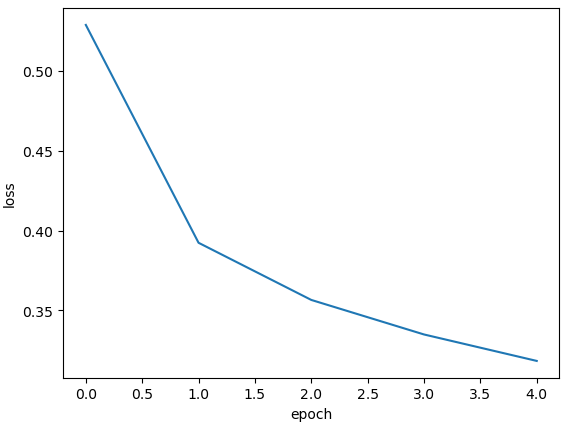
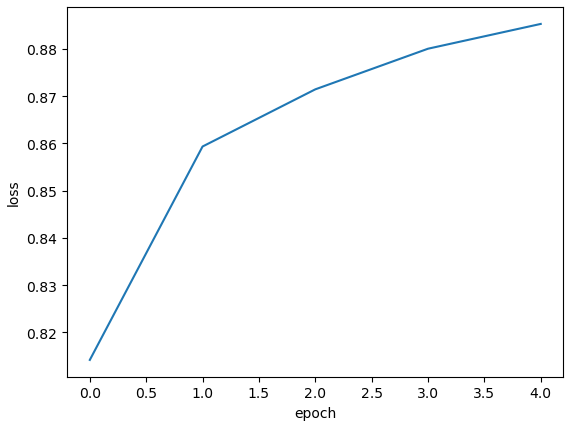
{'accuracy': [0.8141666650772095, 0.8593541383743286, 0.8714583516120911, 0.8800625205039978, 0.8853124976158142], 'loss': [0.5289159417152405, 0.3923627436161041, 0.3565346598625183, 0.3348881006240845, 0.3183060884475708]}
dict_keys(['accuracy', 'loss'])
- 기본적으로 손실을 계산하고 compile에서 accuracy를 추가하여서 loss와 accuracy가 포함됨
plt.figure()
plt.plot(history.history["loss"])
plt.xlabel("epoch")
plt.ylabel("loss")
plt.show()
plt.figure()
plt.plot(history.history["accuracy"])
plt.xlabel("epoch")
plt.ylabel("loss")
plt.show()
# epoch를 20으로 늘려서 그래프 확인
model = model_fn()
model.compile(loss = "sparse_categorical_crossentropy", metrics = ["accuracy"])
history = model.fit(scaled_train, y_train, epochs = 20, batch_size = 32)

plt.figure()
plt.plot(history.history["loss"], label = "loss")
plt.plot(history.history["accuracy"], label = "acc")
plt.xlabel("epoch")
plt.legend()
plt.show()

검증 손실
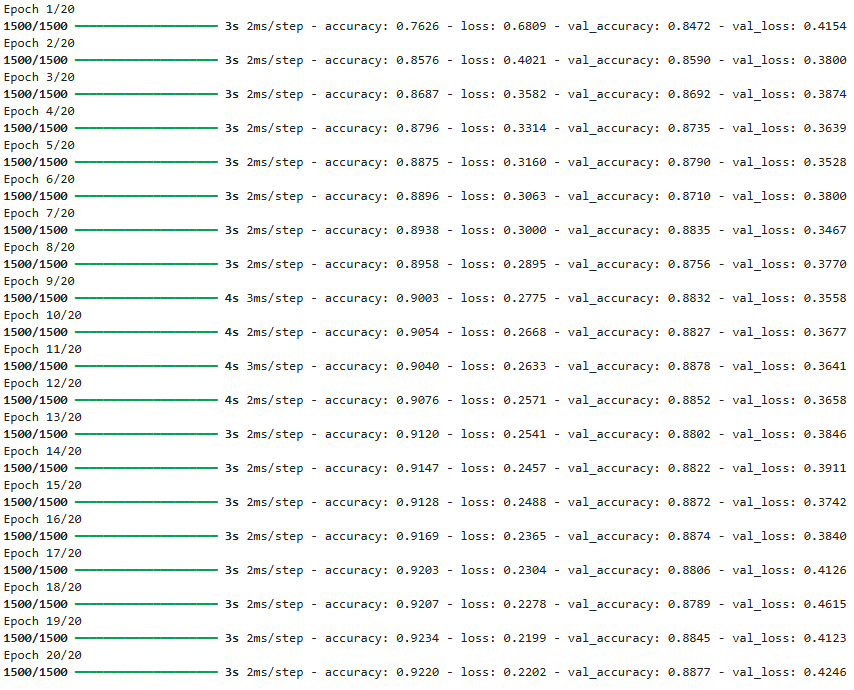
- 에포크에 따른 과대적합과 과소적합을 파악하려면 검증 세트에 대한 점수도 확인해야함
- 케라스에서는 fit() 메서드에 검증 데이터를 전달할 수 있음
model = model_fn()
model.compile(loss = "sparse_categorical_crossentropy", metrics = ["accuracy"])
history = model.fit(scaled_train, y_train, epochs = 20, validation_data = (scaled_val, y_val), batch_size = 32)
print(history.history.keys())
dict_keys(['accuracy', 'loss', 'val_accuracy', 'val_loss'])
plt.figure()
plt.plot(history.history["loss"], label = "train_loss")
plt.plot(history.history["val_loss"], label = "val_loss")
plt.plot(history.history["accuracy"], label = "train_acc")
plt.plot(history.history["val_accuracy"], label = "val_acc")
plt.xlabel("epoch")
plt.legend()
plt.show()
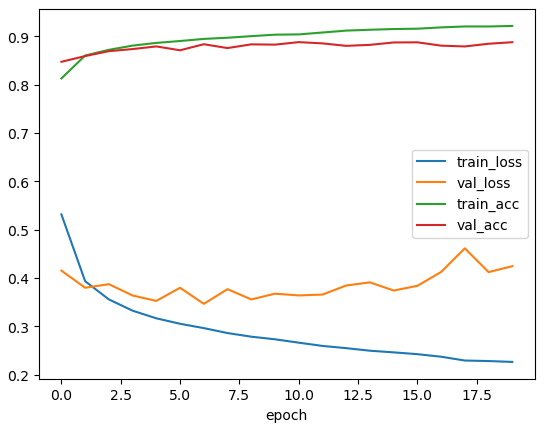
- 훈련 손실은 계속 감소하는데 검증 손실은 감소하다가 상승하여 과대적합 모델이 만들어짐
- 검증 손실이 상승하는 시점을 가능한 한 뒤로 늦출 필요가 있음
# Adam 옵티마이저 선택
model = model_fn()
model.compile(loss = "sparse_categorical_crossentropy", metrics = ["accuracy"], optimizer = "adam")
history = model.fit(scaled_train, y_train, epochs = 20, validation_data = (scaled_val, y_val),
batch_size = 32)

plt.figure()
plt.plot(history.history["loss"], label = "train_loss")
plt.plot(history.history["val_loss"], label = "val_loss")
plt.plot(history.history["accuracy"], label = "train_acc")
plt.plot(history.history["val_accuracy"], label = "val_acc")
plt.xlabel("epoch")
plt.legend()
plt.show()
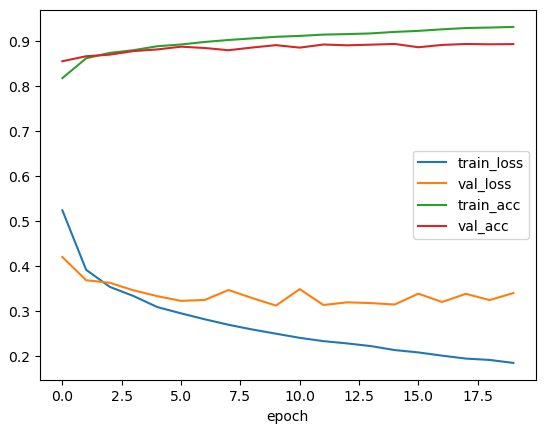
- RMSprop을 사용할 때보다 검증 손실 그래프의 감소 추세가 길게 이어지고 있어 Adam 옵티마이저가 이 데이터셋에 잘 맞는 것으로 보임
드롭아웃(dropout)

- 훈련 과정에서 층의 일부 유닛을 랜덤하게 끄는 것으로(출력을 0으로 만드는 것으로) 과대적합을 방지
- 특정 유닛에 과대하게 의존하는 것을 줄일 수 있음
- 일부 유닛의 출력이 없을 수 있다는 것을 감안하여 학습하게 됨
- 모든 입력값에 대해 충분한 주의를 기울이는 방향으로 학습
- 드롭아웃은 케라스에서 Dropout클래스로 제공
- 특정 층 뒤에 드롭아웃을 두어 해당 층의 출력을 랜덤하게 0으로 만듦
- Flatten과 마찬가지로 층처럼 사용되지만 훈련되는 모델 파라미터가 없음
model = model_fn(keras.layers.Dropout(0.3)) # 30% 드롭아웃
model.summary()

- 드롭아웃 층은 입력과 출력의 크기가 같음
- 일부 유닛의 출력을 0으로 만들지만 전체 출력 배열의 크기를 바꾸지 않음
- 모델 훈련이 끝난 후에 평가나 예측을 수행할 때에는 드롭아웃을 적용하지 않아야 함
- 훈련된 모든 유닛을 사용해야 올바른 예측을 수행할 수 있기 때문에
- 케라스에서는 모델을 평가와 예측에 사용할 때에는 자동으로 드롭아웃을 적용하지 않음
model.compile(optimizer = "adam", loss = "sparse_categorical_crossentropy", metrics = ["accuracy"])
history = model.fit(scaled_train, y_train, epochs = 20, validation_data = (scaled_val, y_val),
batch_size = 32)

plt.figure()
plt.plot(history.history["loss"], label = "train_loss")
plt.plot(history.history["val_loss"], label = "val_loss")
plt.plot(history.history["accuracy"], label = "train_acc")
plt.plot(history.history["val_accuracy"], label = "val_acc")
plt.xlabel("epoch")
plt.legend()
plt.show()
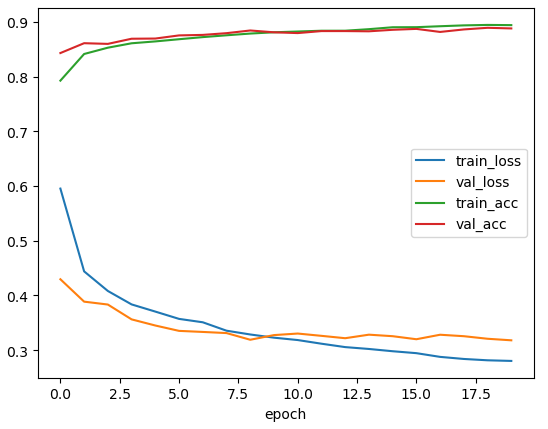
- 앞선 방법들에 비해 loss와 acc가 비교적 일정하게 유지됨
모델 저장과 복원
- 케라스 모델은 모델의 파라미터를 저장하는 save_weights() 메서드를 제공
- 모델 구조와 모델 파라미터를 제공하는 save() 메서드도 제공
model.save_weights("./model/model.weights.h5") # .weights.h5 : 확장자
model.save("./model/model-whole.keras") # .keras : 전체 모델을 저장할 때의 확장자
모델 파라미터만 읽어오기
model_weight = model_fn(keras.layers.Dropout(0.3))
model_weight.load_weights("./model/model.weights.h5")
- load_weights() 메서드를 사용하면 save_weights() 로 저장했던 모델과 정확히 같은 구조를 가져야함
- 텐서플로 버전에 따라 load_weights() 의 버그로 인해 evaluate()를 사용하기 전에 compile()을 반드시 실행해야 하는 경우가 있음
scaled_val.shape
model_weight.predict(scaled_val).shape

(12000, 10)
# 첫 번째 검증 데이터에 대한 예측값
model_weight.predict(scaled_val)[0]

array([5.6639659e-01, 3.8576734e-05, 1.3055797e-02, 2.5340202e-01,
       3.0511387e-03, 6.0071110e-05, 1.6313180e-01, 2.1901755e-10,
       8.6395926e-04, 1.9496866e-08], dtype=float32)
y_val[0]
0
val_labels = np.argmax(model_weight.predict(scaled_val), axis = -1)

val_labels[0]
0
y_val[0]
0
val_labels == y_val
array([ True, True, True, ..., True, True, True])
np.mean(val_labels == y_val)
0.8881666666666667
- 케라스의 predict() 메서드는 모델의 예측을 수행
- 종속변수가 10개의 클래스로 이루어져있기 때문에 각 클래스에 대한 확률을 반환
- predict() 결과에서 가장 큰 값을 고르기 위해 argmax() 함수를 사용
- 배열에서 가장 큰 값의 인덱스를 반환
- 몇 번째 클래스에 대한 확률값이 가장 큰지 반환
- 몇 번째 클래스로 예측했는지 알 수 있음
- argmax() 함수의 axis = -1 은 배열의 마지막 차원을 따라서 최댓값을 고름
- axis = 1 이면 열을 따라 각 행의 최댓값의 인덱스를 선택
- axis = 0 이면 행을 따라 각 열의 최댓값의 인덱스를 선택
- argmax()로 고른 인덱스와 타깃 인덱스를 비교하여 같으면 1, 다르면 0
- 위 값의 평균을 구하면 정확도가 됨
모델 전체 읽어오기
model_whole = keras.models.load_model("./model/model-whole.keras")
model_whole.evaluate(scaled_val, y_val)

[0.3179406225681305, 0.8881666660308838]
콜백(callback)
- 훈련 과정 중간에 어떤 작업을 수행할 수 있게 하는 객체
- fit() 메서드의 callbacks 매개변수에 리스트로 전달하여 사용
ModelCheckpoint 콜백
- 최상의 검증 점수를 만드는 모델을 저장
checkpoint_cb = keras.callbacks.ModelCheckpoint("./model/best-model.keras", save_best_only = True)
# save_best_only = True : 최고의 모델(최저epoch)일때만 저장
model = model_fn(keras.layers.Dropout(0.3))
model.compile(optimizer = "adam", loss = "sparse_categorical_crossentropy", metrics = ["accuracy"])
history = model.fit(scaled_train, y_train, epochs = 20, validation_data = (scaled_val, y_val),
callbacks = [checkpoint_cb], batch_size = 32)

- 모델이 훈련한 후에 best-model.keras에 최상의 val_loss를 낸 모델이 저장됨
model.evaluate(scaled_val, y_val)
# 20에포크가 끝난 상태가 저장되어있음

[0.32728010416030884, 0.8872500061988831]
best_model = keras.models.load_model("./model/best-model.keras")
best_model.evaluate(scaled_val, y_val)
# 최상의 검증상태가 저장됨

[0.31871214509010315, 0.887416660785675]- ModelCheckpoint 콜백이 가장 낮은 검증 손실값의 모델을 자동으로 저장해주어 편하지만 여전히 20번의 훈련을 해야해서 불편함이 있음
EarlyStopping 콜백
- 과대적합이 시작되기 전에(검증점수가 상승할 때)훈련을 미리 중지하는 것을 조기 종료(early stopping)라고 부름
- 훈련 에포크 횟수를 제한하는 역할이지만 모델이 과적합되는 것을 막아 주기 때문에 규제 방법 중 하나로 여겨지기도 함
early_stopping_cb = keras.callbacks.EarlyStopping(patience = 2, restore_best_weights = True)
- patience
- 검증 점수가 향상되지 않더라도 지켜볼 에포크 횟수
- patience 가 2라면 2번 연속 검증 점수가 향상되지 않으면 훈련 중지
- restore_best_weights
- 가장 낮은 검증 손실을 낸 모델의 상태로 되돌림
model = model_fn(keras.layers.Dropout(0.3))
model.compile(optimizer = "adam", loss = "sparse_categorical_crossentropy", metrics = ["accuracy"])
history = model.fit(scaled_train, y_train, epochs = 20, validation_data = (scaled_val, y_val),
callbacks = [checkpoint_cb, early_stopping_cb], batch_size = 32)

# 몇 번째 에포크에서 중지되었는지 확인
print(early_stopping_cb.stopped_epoch)
4
- 5번째 에포크까지 훈련한 후 중지됨
- patience가 2이기 때문에 3번째 에포크 때의 모델이 최상의 모델임
model.evaluate(scaled_val, y_val)

[0.36178240180015564, 0.871999979019165]
plt.figure()
plt.plot(history.history["loss"], label = "train_loss")
plt.plot(history.history["val_loss"], label = "val_loss")
plt.plot(history.history["accuracy"], label = "train_acc")
plt.plot(history.history["val_accuracy"], label = "val_acc")
plt.xlabel("epoch")
plt.legend()
plt.xticks(ticks = range(20))
plt.show()

validation_split
- 훈련 데이터를 자체적으로 훈련/검증 셋으로 나누어서 훈련/검증을 수행
(x_train, y_train), (x_test, y_test) = keras.datasets.fashion_mnist.load_data()
scaled_train = x_train / 255
scaled_test = x_test / 255
cp_cb = keras.callbacks.ModelCheckpoint("./model/best-model.keras", save_best_only = True)
es_cb = keras.callbacks.EarlyStopping(patience = 2, restore_best_weights = True)
model = model_fn(keras.layers.Dropout(0.3))
model.compile(optimizer = "adam", loss = "sparse_categorical_crossentropy", metrics = ["accuracy"])
history = model.fit(scaled_train, y_train, epochs = 20, validation_split = 0.2, batch_size = 32,
callbacks = [cp_cb, es_cb])
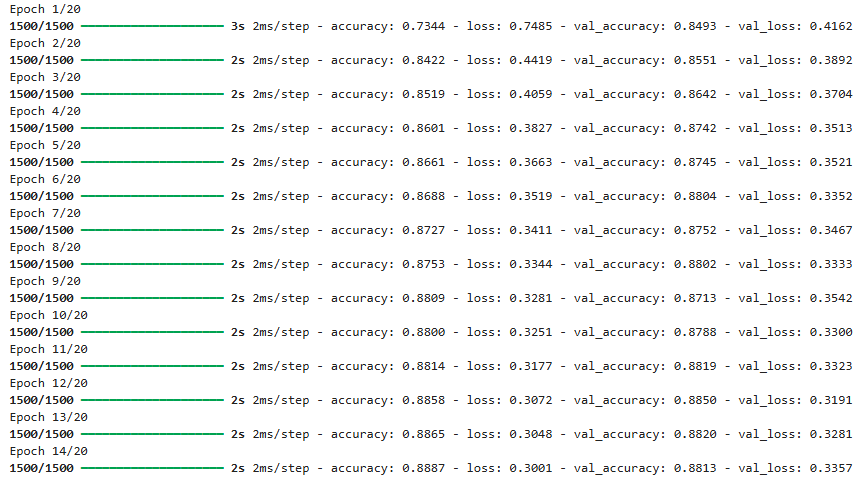
# validation_split = 0.2 따로 20%는 테스트데이터로 빼놓음
plt.figure()
plt.plot(history.history["loss"], label = "train_loss")
plt.plot(history.history["val_loss"], label = "val_loss")
plt.plot(history.history["accuracy"], label = "train_acc")
plt.plot(history.history["val_accuracy"], label = "val_acc")
plt.xlabel("epoch")
plt.legend()
plt.xticks(ticks = range(20))
plt.show()

model.evaluate(scaled_test, y_test)

[0.3501654863357544, 0.8744999766349792]728x90
'09_DL(Deep_Learning)' 카테고리의 다른 글
| 06_초음파 광물 예측 (0) | 2025.04.24 |
|---|---|
| 05_다중분류(Iris) (0) | 2025.04.23 |
| 월별 사인(sin) 코사인(cos) 시각화 (0) | 2025.04.21 |
| 03_다층 인공신경망 (0) | 2025.04.18 |
| 02_단층 인공신경망 (1) | 2025.04.18 |